
Mobile Banking for Members on the Go
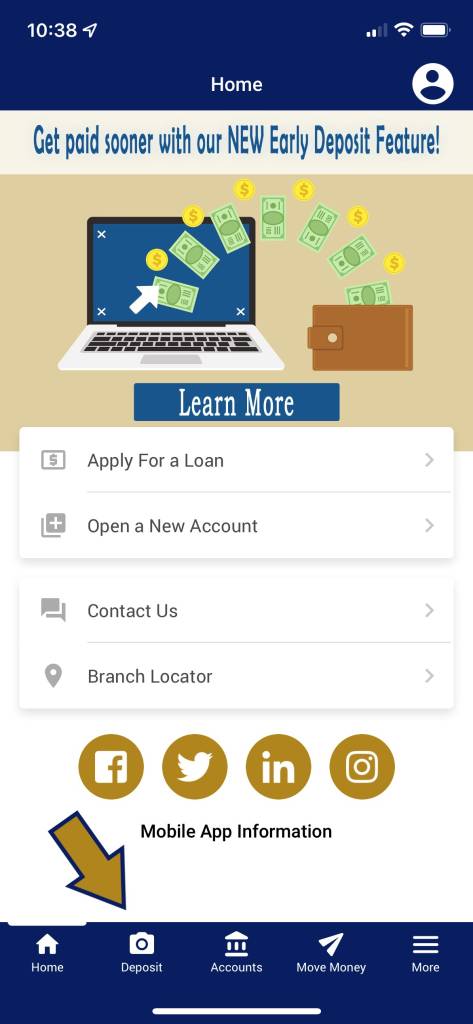
Remote Deposit Capture
What is Remote Deposit Capture?
Remote Deposit Capture (RDC) is a service that allows members to deposit checks from their mobile device. Members must be enrolled in online banking and download our mobile app to use this service. Members can scan checks by taking a picture with their camera-enabled mobile device through the Members Source mobile app. The scanned image is then sent to Members Source for posting and clearing. This means members will no longer be forced to come in to one of our branch locations to deposit a check.
- Log into your account through the mobile app
- Tap on the camera icon
- Enter the amount of your deposit
- Take a picture of the front and back of your check
- Click Submit





Here are the first-time login instructions:
- Call 888-894-3424
- Enter your member number, then press #
- Enter your temporary PIN (the last four digits of the primary member’s SSN), then press #
- You will be prompted to enter a new PIN, then press #
- Confirm your new PIN (must be 4 digits)
- Select a Main Menu Option:
- Account inquires, including balances and recent transactions
- Funds transfers
- Hear current rates or calculate estimated loan payments
- Change your PIN
- Change to a different member number
- Other CU services, including locations and hours
- Repeat this menu
- End the call
- CU*Talk Tutorial (press * to exit the tutorial and return to the main menu)
Telephone Teller - CUTalk

Credit union service right at your fingertips!
- Review account balances
- Verify the date and amount of your transactions, including deposits, withdrawals, transfers and payments
- Verify whether certain checks have cleared
- Transfer funds between accounts
- Make loan payments
- Check current rates
- Calculate estimated loan payments
- Obtain annual dividend and interest information
Text Banking

WITH TEXT BANKING YOU CAN…
- Send a text message command to receive text message replies regarding the balance of your savings, checking, certificate, loan, and credit card accounts.
- Enroll in e-Alerts and receive notices regarding account balances, electronic deposits, withdrawals, or when a payment is due.
TEXT BANKING COMMMANDS
- BAL – Balance for up to three savings or checking accounts
- BAL ### – Balance for a specific account, where (#) is the 3-digit account suffix (for example BAL 000 would provide the balance for the primary savings suffix and BAL 100 would provide the balance for checking suffix)
- STOP – Turns off all text banking
- HELP – Provides you with help for un-enrollment
One-Way Text Alerts
You can set up one-way Text alerts via the e-Alert Subscriptions page, and create alerts similar to your standard e-Alerts, such as: Account Balance, Notification of an ACH deposit or withdrawal, Notification that a loan payment is due, E-Notice notification.
Members Source Credit Union does not charge for this service, however you should check with your mobile phone carrier if you aren’t sure what fees apply when you send and receive text messages.
You can enroll in Text Banking by hovering over the ‘Go Mobile’ button on the It’sMe247 toolbar. Then click Text Banking to access the enrollment screens. After enrollment, text commands to IM247 (46247).
Download on the App Store Get it on Google Play
